

Exam sources checked: . See source versions and claim types.
You can begin studying for CompTIA Security+ SY0-801 without first earning Network+. CompTIA’s published V8 objectives do not list Network+ as a prerequisite. Their recommended-experience entry (PDF page 3) describes a security administrator with two years of hands-on experience. Whether to study networking first should depend on the skills you already have and the work you want to learn.
Exam registration is a separate question. The objectives describe exam content and recommended experience; they are not a complete statement of testing eligibility. This guide does not treat the absence of Network+ in that document as verification of every registration rule. Use Pearson VUE’s CompTIA testing page to reach current scheduling and candidate-policy information before purchasing an exam.
Choose your next practice task: Try the six-case foundation check and review-plan builder below. Get explanations, flag skills you want to revisit, and download a study worksheet.
Security+ prerequisites, recommendations and foundations
People often use “prerequisite” to mean several different things. A training provider might expect prior knowledge before its course, while an employer might require a particular credential. Neither automatically establishes what the exam provider requires.
| Category | What it means | How it applies to your decision |
|---|---|---|
| Formal exam eligibility | Rules governing whether you can register and test | Confirm the current testing policy directly with CompTIA; do not infer every rule from the objectives |
| V8 recommended experience | The background CompTIA recommends for SY0-801 | The objectives identify two years of hands-on experience as a security administrator |
| Useful foundations | Skills that make the security material easier to understand and practice | Assess your networking, operating-system and account-management knowledge |
| Course or employer requirements | Conditions set by a particular organization | Check that organization’s own wording separately |
The V8 recommendation comes from the official SY0-801 objectives, document version 2.0. Its recommended-experience field does not name Network+. Avoid carrying a recommendation from an older Security+ page into V8 without checking the version.
Two years in a role is a background recommendation, not a study-time estimate. It does not mean a course takes two years, or that a certain number of home-lab hours is an official substitute. Use the recommendation to understand the level of practical context the exam expects.
Why networking knowledge still matters for Security+ V8
Security decisions often depend on understanding how devices communicate. If you cannot identify the source, destination and intended service, it becomes difficult to judge whether a firewall rule is appropriate. If you do not understand name resolution, a DNS problem can look like an application or security failure.
Consider an employee who can reach an internal application from the office but cannot reach it over a VPN. Useful first questions concern the address being resolved, the network path and the access policy. Memorizing the definition of “VPN” will not explain which of those conditions changed.
The Security+ SY0-801 objectives guide helps you see where these foundations support the wider syllabus. The goal is to connect concepts to evidence: what should happen, what actually happened and which control addresses the difference.
Original Trifectapp practice · 6 cases · About 15 minutes
Check your foundations and build a review plan
Use these small scenarios to identify skills you want to strengthen. Check each answer, flag any skill you would like to revisit, then build a practical review plan.
Use the evidence in each case. The addresses, accounts, logs and rules are fictional teaching inputs. This activity makes no network connections and changes no system settings.
This is a foundation study aid. Six answers cannot establish exam readiness, eligibility or a required certification order. You can begin learning Security+ while reviewing unfamiliar foundations.
Case 1 · The destination is on another subnet
IP addresses, subnets and gateways
A fictional workstation needs to reach an application server. Its IPv4 configuration is correct, and there is no more-specific route to the server network.
Workstation: 192.0.2.25/24
Local subnet: 192.0.2.0/24
Default gateway: 192.0.2.1
Application server: 198.51.100.20
Worked solution and practice task
Best choice: The default gateway, because the server is outside the local subnet. The server is outside 192.0.2.0/24. With no more-specific route, the workstation sends the packet through its configured default gateway.
Practice task: On paper, classify 192.0.2.80 and 198.51.100.20 as local or remote for this workstation. Draw the next hop for each; keep the packet destination separate from the gateway address.
Completion check: 192.0.2.80 is local; 198.51.100.20 uses gateway 192.0.2.1 under the stated route assumptions. You can explain why the remote server remains the packet's destination.
Why the other choices miss the requirement
- The DNS resolver, because it forwards traffic to remote networks: DNS supplies name information. It does not become the next-hop router merely because an application uses a hostname.
- The server directly on the local subnet, because both addresses use IPv4: Using IPv4 does not place two hosts on the same subnet. The workstation must consider its subnet mask and routing information.
- The HTTPS service, because port 443 determines the network next hop: A destination port identifies a transport endpoint. The routing decision uses the destination IP address and route information.
Next resource: Review IPv4 addressing and default gateways
Technical references: Microsoft Learn: TCP/IP addressing and subnetting, “Default gateways” (KB 164015). The case facts are original teaching examples.
Case 2 · The name points to the wrong server
DNS versus connectivity
An application has moved to a new IPv4 address. The approved configuration names one destination, but the workstation receives an old DNS answer. The required TCP/443 path to the approved destination is already allowed.
Hostname: portal.study.example
Approved A record: 198.51.100.20
Observed DNS answer: 198.51.100.99
198.51.100.99 is the retired destination
Worked solution and practice task
Best choice: Compare the DNS record and cached answer with the approved change. Investigate the record and relevant resolver or client caches against the approved destination. Correct the mismatch through the documented change process; opening a service port cannot rewrite a DNS answer.
Practice task: Make a two-column note: DNS chooses an address; a firewall decides whether a described flow is permitted. Place the wrong A record and an HTTPS deny rule in their respective columns.
Completion check: After an approved correction, a fresh lookup should return the intended address. Then verify the application connection separately, retaining normal certificate validation.
Why the other choices miss the requirement
- Add another TCP/443 allow rule to the approved server: The required path is already allowed. Repeating that rule does not change the address returned for the hostname.
- Replace the workstation's default gateway: The evidence identifies a mismatch in name resolution. It does not show an incorrect gateway.
- Disable certificate checks so the old address can be used: Disabling certificate checks does not correct the DNS answer and would weaken server-identity verification.
Next resource: Work through ports and protocols practice
Technical references: IETF RFC 1035, section 3.4.1: IPv4 address records. The case facts are original teaching examples.
Case 3 · A working connection is only one check
Allowed and denied traffic
A fictional firewall policy permits staff to use the application server over TCP/443. Guests must be blocked from that service, and staff must not reach its TCP/22 listener. Routing and both server listeners are known to work in this lab.
Staff test host: 192.0.2.10
Guest test host: 203.0.113.10
Application server: 198.51.100.20
Observed so far: staff TCP/443 connection succeeds
Worked solution and practice task
Best choice: Confirm staff TCP/443 succeeds, guest TCP/443 fails, and staff TCP/22 fails; check matched-rule logs. This checks the permitted service and both stated restrictions. Matched-rule logs help confirm that the firewall enforced each expected result.
Practice task: Write a three-row test matrix with source, destination, transport/port, expected outcome and evidence. Use only these fictional flows; this worksheet does not run network tests.
Completion check: Your matrix includes one expected allow and two expected denies. Each row names the matched firewall rule or log evidence you would inspect, rather than treating every connection failure as proof of blocking.
Why the other choices miss the requirement
- Repeat the successful staff TCP/443 test several times: Repeating the allowed path can check consistency, but it does not test whether the prohibited paths are blocked.
- Ping the server from the staff and guest hosts: ICMP echo results do not establish whether the TCP/443 and TCP/22 policy is enforced.
- Confirm that the guest TCP/443 connection fails and stop: That covers one restriction only. It leaves the approved staff service and the staff TCP/22 restriction unverified.
Next resource: Explore the original Security+ PBQ examples
Technical references: NIST SP 800-41 Rev. 1 (2009), sections 5.2.3–5.3: logging and firewall testing. The case facts are original teaching examples.
Case 4 · Sign-in succeeds, but a file is denied
Authentication and authorization
A user signs in successfully as a help-desk analyst. The same session can open general support documents but cannot open a payroll file. The documented policy allows only the payroll role to read that file.
Identity check: successful
Assigned role: Help Desk
General support document: allowed
Payroll file: denied
Payroll read permission: Payroll role only
Worked solution and practice task
Best choice: Authentication succeeded, and authorization correctly denied the restricted file. The service recognized the user, then applied the file's access policy. The stated help-desk role has no payroll read permission, so this denial matches the policy.
Practice task: Draw two steps: establish the account identity, then evaluate its permission for a specific resource. Add the allowed support file and denied payroll file as separate examples.
Completion check: You can explain how the same authenticated session can receive different access decisions, and why any new permission needs a legitimate approved task.
Why the other choices miss the requirement
- Authentication failed because the payroll file did not open: The identity check succeeded. A later resource-access denial does not reverse that authentication result.
- Successful authentication should grant access to every file: Proving an identity does not grant unrestricted permissions. Access still depends on authorization for the requested resource.
- The user needs an administrator role to repair the sign-in: The sign-in is already working. Granting broad administrator access would not follow the stated task or the least-privilege principle.
Next resource: Practice access decisions in the PBQ guide
Technical references: NIST: authentication · NIST: authorization · NIST: least privilege. The case facts are original teaching examples.
Case 5 · A service fails after an update
Evidence-led troubleshooting
A service in an isolated training environment stops responding shortly after an approved update. A timeline is available, but nobody has yet compared the service logs, dependencies or changed configuration.
07:55 — service health check passes
08:00 — approved update begins
08:03 — installer reports completion
08:04 — service health check fails
Cause has not been established
Worked solution and practice task
Best choice: Compare the change record, versions and logs, check dependencies, then repeat a controlled health check. Use the recorded change and failure evidence to narrow the cause. Check the installed state and dependencies, and record repeatable results before deciding on an approved fix or rollback.
Practice task: Create a timeline from the four fictional events. Add one hypothesis, the evidence needed to test it, and one repeatable health check. Keep observation and conclusion in separate columns.
Completion check: Your note distinguishes 'failure followed the update' from 'the update caused the failure.' It identifies a controlled check and treats rollback as a decision under the approved change procedure.
Why the other choices miss the requirement
- Declare the update defective because it happened before the failure: The timing makes the update a useful hypothesis, but sequence alone does not establish the cause. A dependency or another change may explain the failure.
- Disable endpoint protection and the firewall before collecting evidence: This changes several variables and weakens controls without evidence that either caused the failure.
- Reinstall every dependency immediately and discard the old logs: Broad changes can erase useful evidence and introduce additional faults. Preserve the timeline and investigate specific differences first.
Next resource: Explore the Security+ lab and tabletop guide
Technical references: NIST SP 800-40 Rev. 4 (2022), sections 2.3.3–2.3.4: verifying and monitoring updates. The case facts are original teaching examples.
Case 6 · The certificate names another service
TLS and server identity
A fictional sign-in page presents a certificate from a trusted issuer and within its validity dates. However, the certificate does not cover the hostname requested by the learner. No wildcard or other matching name is present.
Requested hostname: portal.study.example
Certificate DNS name: files.study.example
Trust-chain check: passed
Validity-date check: passed
Hostname match: failed
Worked solution and practice task
Best choice: Stop credential entry and verify the intended address and certificate configuration through an approved channel. The hostname mismatch means the intended service identity has not been verified. Investigate the address and certificate configuration without bypassing validation or sending credentials.
Practice task: Compare these two fictional checks: portal.study.example against a certificate naming portal.study.example, and against one naming files.study.example. Record the name-match result separately from trust and validity dates.
Completion check: You can identify the matching and mismatching names and explain why trust, validity dates and service identity all matter. These examples do not ask you to bypass a real browser warning.
Why the other choices miss the requirement
- Enter credentials because a trusted issuer is enough: A trusted issuer does not make a certificate valid for every hostname. The presented identity must also match the intended service.
- Continue because encrypted traffic proves the intended server's identity: Encryption and identity verification are related but distinct checks. An encrypted connection alone does not establish that this is the intended service.
- Change the workstation clock because every certificate error is a date error: The evidence explicitly says the validity-date check passed. Changing the clock does not correct the hostname mismatch.
Next resource: Connect HTTPS to transport and security checks
Technical references: IETF RFC 9525 (2023), section 6.6: service-identity mismatch in TLS. The case facts are original teaching examples.
Choose what to review next
Check all six cases. The plan will include skills from incorrect answers and any skills you flag for more practice.
A plan highlights incorrect answers and any skills you choose to review. Changing an answer or review choice clears the previous plan.
Keep your foundation practice
Download the foundation practice pack (ZIP)
Includes the offline check and review-plan builder, a blank foundation worksheet, synthetic evidence, worked solutions and instructions. No account is required.
Activity v1.0 · Published November 7, 2026. Original scenarios and study guidance by Trifectapp; not official CompTIA exam questions. Answers and flags stay in this page session and reset on reload. This activity does not submit or store your answers.
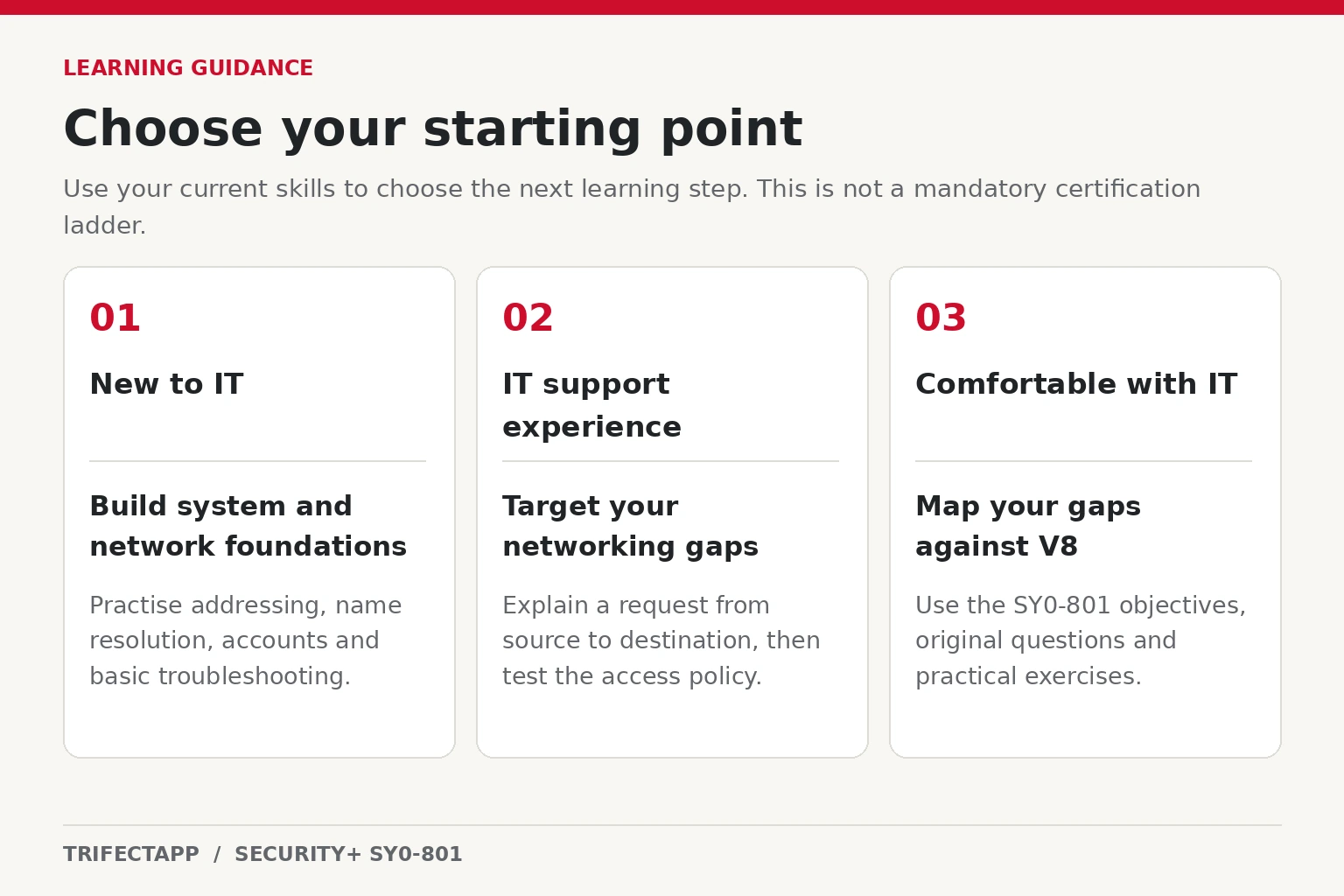
Choose a starting path that fits your experience
You are new to IT
Start with everyday system and network behavior: user accounts, files, permissions, services, addresses and connectivity. Work through small tasks until you can describe both the intended result and how you checked it. Introductory material can give you a gentler entry point before you attempt dense security scenarios.
You can read introductory Security+ lessons alongside this work. When a lesson assumes a concept you do not understand, add that concept to your foundation checklist. You do not need to postpone every security topic until you complete an entire certification sequence.
You work in IT support but have networking gaps
A structured networking course may be the most useful next step. Use it to understand the problems behind familiar tickets: address assignment, DNS, routing, wireless connectivity and remote access. Decide separately whether earning Network+ would support a named employer requirement or your own learning goals.
Keep a record of tasks you can now complete independently. “Explain why this device cannot reach that service” is stronger evidence of learning than “finished chapter six.” When your gaps become specific, move into targeted Security+ preparation and revisit networking as needed.
You already administer networks or systems
Begin with a V8 diagnostic and the full objectives. Your existing experience may let you focus directly on unfamiliar security concepts, risk decisions and operational practices. Still test familiar areas: working with one product or environment does not establish coverage of the whole syllabus.
Our free SY0-801 practice questions can reveal topics to investigate. Read the explanations even when your answer is correct, especially if you selected it through familiarity rather than clear reasoning.
When is Network+ before Security+ a useful choice?
Consider Network+ as a separate learning and credential decision. It may fit when networking is a major weakness, you want a structured networking assessment, or a role you are pursuing explicitly requests it. Check current requirements for that role rather than assuming a certification order guarantees an employment outcome.
If your immediate goal is Security+ and your networking foundation is already sound, a targeted gap review may be enough to begin V8 preparation. You can study networking material without committing immediately to the Network+ exam. Budget your time for understanding and practice before deciding how many examinations to purchase.
Whichever route you choose, keep practical work in it. Try the original SY0-801 PBQ-style exercises and Security+ lab activities. Explain why a change is appropriate and verify that it produces the intended result.
Turn your decision into a preparation plan
Create two short lists: foundations to strengthen and V8 topics to learn. Give every item a concrete activity and a completion check. For a DNS gap, explain a name-resolution failure; for an access-control gap, compare permissions before and after a role change.
Once you have identified your starting point, adapt the eight-week SY0-801 study plan to your available time. The schedule is an organizing aid. Progress depends on what you can explain and apply, so extend a topic when the evidence shows that you need more practice.
Review the Trifectapp Security+ course curriculum to see where its lessons and practice fit your list. Before booking, check the exam code, current availability and applicable testing requirements directly with CompTIA.
Frequently asked questions
Is Network+ listed as a Security+ SY0-801 prerequisite?
It is not listed as a prerequisite in the published V8 objectives. That document’s recommended-experience field names two years of hands-on security-administrator experience. General registration policy is separate and should be confirmed before booking.
Can I start Security+ with no work experience?
You can begin learning. Allow time to build practical context through structured exercises and foundation study. Starting a course and being prepared for an exam are different milestones.
Do I have to finish A+ first?
You can begin Security+ study without completing A+. Review basic IT skills if they are unfamiliar; an earlier credential should be a deliberate learning choice rather than an assumed condition for opening the next textbook.
Does passing Network+ make me ready for Security+?
It does not establish complete V8 coverage. Compare your knowledge with the SY0-801 objectives and assess the security topics separately.
Sources, versions and claim types
Exam-source check: November 7, 2026. This guide uses CompTIA Security+ SY0-801 V8 objectives, document version 2.0. Page 2 describes the target background; page 3 contains the recommended-experience field.
- Official recommendation: the experience entry is recommended background. It does not prescribe a two-year course or an official replacement number of home-lab hours.
- Registration requirements: the objectives are a syllabus, not a complete eligibility policy. Check the current CompTIA testing and policy links at Pearson VUE separately.
- Trifectapp guidance: the suggested starting paths, six fictional foundation cases and review-plan labels are original teaching aids, not required certification steps or an exam-readiness assessment.
Technical references are linked beside each worked solution so you can check the specific networking, access-control, update and TLS reasoning.