
For CompTIA Security+ SY0-801 ports and protocols, learn the service, server destination port, transport and reason to permit the connection. HTTPS commonly uses port 443, for example, but a firewall decision also depends on whether the application needs TCP, UDP or both.
This is an editorial study reference, not an official exhaustive list of ports CompTIA requires candidates to memorize. The official Security+ V8 objectives, version 2.0 include ports and services as attack surfaces in objective 2.4, secure communication and access in 3.2, and cryptographic solutions in 1.3. Use the table alongside our SY0-801 exam objectives guide, then practice explaining why a connection should be permitted.
Try it yourself: Work through five original ports and protocols troubleshooting cases below, with answer feedback and a downloadable offline practice pack.
Read a port entry as a connection requirement
A useful reference identifies the service, server port and transport. TCP 443 and UDP 443 are different firewall matches. A client also has a source port, often temporarily selected by its operating system; it does not normally use the server’s listening port as its own source port.
The IANA registry records service assignments, but an assignment does not prove what application is actually running. Services can use other ports, and malicious traffic can use familiar ones. Check the configuration, process, handshake and logs before concluding that a connection is expected or encrypted.
Security+ SY0-801 ports and protocols reference table
These are common defaults and deployment patterns. The transport column describes the usage being studied, rather than every historical registry allocation. Numbers are server destination ports unless the row says otherwise.
| Service | Port | Transport | Security context |
|---|---|---|---|
| FTP | 21 control; 20 traditionally active-mode server data source | TCP | Plain FTP lacks transport encryption; passive data uses negotiated ports. |
| SSH / SFTP | 22 | TCP | Encrypted remote access / file transfer over SSH. |
| Telnet | 23 | TCP | Traditional remote terminal traffic lacks encryption. |
| SMTP relay | 25 | TCP | Server-to-server mail; STARTTLS may protect the hop. |
| Mail submission | 587 / 465 | TCP | 587 commonly uses STARTTLS; 465 uses implicit TLS. |
| DNS | 53 | UDP and TCP | Ordinary DNS transport is unencrypted. |
| DHCPv4 | 67 server / 68 client | UDP | Automatic address configuration; trust the authorized server. |
| HTTP | 80 | TCP | HTTP without TLS exposes application traffic. |
| HTTPS | 443 | TCP; UDP for HTTP/3 | TLS-protected web traffic; HTTP/3 uses QUIC. |
| Kerberos | 88 | TCP and UDP | Ticket-based authentication; not a general encryption tunnel. |
| POP3 / POP3 over TLS | 110 / 995 | TCP | 995 starts with TLS; 110 can negotiate STLS. |
| IMAP / IMAP over TLS | 143 / 993 | TCP | 993 starts with TLS; 143 can negotiate STARTTLS. |
| NTP | 123 | UDP | Time synchronization; restrict permitted time sources. |
| SNMP | 161 requests / 162 notifications | UDP | Use appropriately configured SNMPv3 authentication and privacy. |
| LDAP / LDAPS | 389 / 636 | TCP | 389 can use StartTLS; 636 starts with TLS. |
| SMB | 445 | TCP | File sharing; verify signing and encryption separately. |
| Syslog / syslog over TLS | 514 / 6514 | UDP / TCP | 514 is unencrypted UDP syslog; 6514 protects transport with TLS. |
| RADIUS | 1812 authentication / 1813 accounting | UDP | AAA traffic; these numbers do not establish full-packet encryption. |
| RDP | 3389 | TCP and UDP | Remote desktop; restrict access to approved management paths. |
Check assignments in IANA and implementation details in Microsoft’s service-port reference. Protocol-specific references include DHCPv4, NTP, SNMP transport, UDP syslog, TLS syslog and RDP.
Four distinctions that prevent common mistakes
1. HTTPS can require TCP or UDP
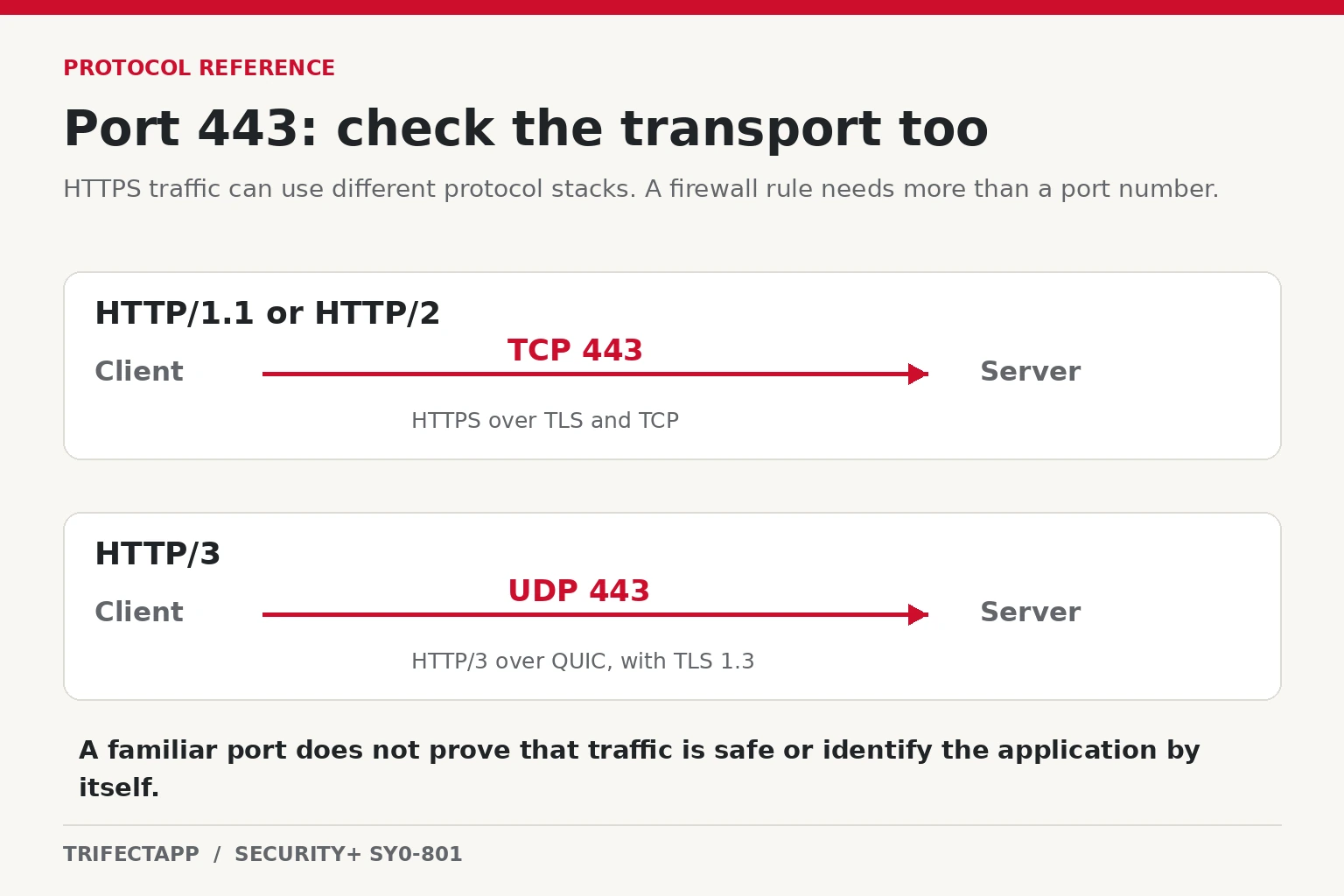
HTTPS using HTTP/1.1 or HTTP/2 normally runs over TLS on TCP 443. HTTP/3 uses QUIC over UDP, commonly port 443. Blocking UDP 443 can prevent HTTP/3 while a browser still loads the site through a TCP-based fallback. That outcome does not prove the UDP rule works.
QUIC is a transport used by more than HTTP/3, and deployments can use alternative ports. Decide which application and transport the organization actually needs. RFC 9114 defines HTTP/3; RFC 9308 discusses QUIC deployment and port usage.
2. DNS needs more than “UDP 53”
Ordinary DNS uses both UDP and TCP 53. TCP is not limited to zone transfers: clients can retry over TCP after a truncated UDP response, and TCP can carry ordinary queries. A rule allowing only UDP may therefore produce intermittent-looking failures. RFC 7766 covers implementation support; RFC 9210 §3 (March 2022) sets the operational requirement to support DNS over TCP.
Encrypted DNS has different mappings: DNS over TLS uses TCP 853 by default; DNS over QUIC uses UDP 853 by default. DNS over HTTPS travels within HTTPS, commonly port 443. Encryption protects the transport; resolver trust and organizational DNS policy still matter.
3. SFTP and FTPS are different protocols
SFTP transfers files over SSH, normally TCP 22. FTPS adds TLS to FTP. With explicit FTPS, the client connects to TCP 21 and requests TLS using AUTH TLS. Implicit FTPS commonly starts TLS immediately on TCP 990.
FTP-based transfers still have separate control and data connections. Passive transfers need the configured server data-port range; opening 21 or 990 alone is insufficient. Also verify data-channel protection: RFC 4217 distinguishes control-channel TLS from the PROT P setting that protects transferred data. Avoid treating “FTP data equals port 20” as a universal firewall rule.
4. STARTTLS is an upgrade, not a port guarantee
Implicit TLS starts protection at connection establishment. STARTTLS begins in the application protocol and upgrades the connection. LDAP on 389 can use StartTLS, while LDAPS commonly uses implicit TLS on 636. Consequently, “389 means unencrypted” is an unreliable conclusion. See LDAP’s StartTLS operation.
Similarly, SMTP 25 serves mail relay, 587 serves message submission, and 465 provides submission with implicit TLS. Configure clients and servers to require the intended protection and validate certificates before sending credentials or sensitive content. Choosing 587 does not itself require a successful TLS negotiation. RFC 8314 covers encrypted mail submission and access.
Original Trifectapp practice · 5 cases · About 15 minutes
Ports and protocols troubleshooting practice
Read the evidence, select the narrowest rule that restores the approved service, then check your reasoning. Each case connects a service to its transport, destination port and permitted endpoints.
Scenario assumptions: The firewall tracks connection state and permits matching return traffic. Other new flows are denied unless allowed. Each requested flow is initiated by the client toward the named server; keep existing required rules. Routing, DNS resolution where needed, server listeners, credentials and certificates have already been checked.
These are fictional learning cases with synthetic addresses and records. The activity sends no packets and changes no firewall. It is not an official CompTIA question set. The numbers after the client addresses are example source ports, not server destination ports.
Case 1 · DNS works for some names
192.0.2.10198.51.100.53- The approved resolver already accepts this client on UDP/53.
- A UDP response has its truncation flag set. The client then retries the query over TCP.
- Goal: restore ordinary DNS resolution through this approved resolver.
SYNTHETIC FIREWALL RECORDDENY TCP 192.0.2.10:53012 → 198.51.100.53:53
Worked solution and protocol reference
Best choice: Allow client → resolver on TCP/53. Keep the existing UDP/53 rule and permit TCP/53 to the same resolver. The evidence shows a TCP retry after a truncated UDP response.
Verify the result: Repeat the affected query through the approved resolver. Confirm a successful TCP/53 exchange and an allow entry for the expected endpoints; retain UDP/53 support.
Why the other choices miss the requirement
- Allow client → resolver on UDP/5353: Port 5353 is associated with multicast DNS; the denied retry is TCP/53.
- Allow resolver → client on TCP/53 as a new connection: This reverses the initiating direction. Matching return traffic is already permitted by the stated firewall model.
- Allow client → any destination on TCP/53: This would allow the resolver connection, but it also permits destinations outside the approved scope.
Remember: Traditional DNS needs both UDP and TCP support. TCP is not limited to zone transfers.
Protocol reference: RFC 9210 §3. The endpoint scope and configuration are fictional scenario facts.
Case 2 · HTTPS loads, but HTTP/3 does not
192.0.2.20198.51.100.20- Client → approved web endpoint on TCP/443 is allowed. HTTPS over HTTP/2 works.
- The server advertises HTTP/3 on UDP/443, and this approved test requires HTTP/3.
- Goal: enable that HTTP/3 test while preserving the existing TCP-based HTTPS service.
SYNTHETIC FIREWALL RECORDDENY UDP 192.0.2.20:54100 → 198.51.100.20:443
Worked solution and protocol reference
Best choice: Allow client → endpoint on UDP/443. HTTP/3 uses QUIC over UDP. Permit the stated UDP/443 endpoint and preserve TCP/443 for the already approved TCP-based HTTPS service.
Verify the result: Repeat the approved test and confirm that HTTP/3 was negotiated. A page loading through HTTP/2 fallback does not verify the UDP path.
Why the other choices miss the requirement
- Allow client → endpoint on TCP/443 again: The existing TCP rule supports TCP-based HTTPS, not the denied UDP flow.
- Allow client → endpoint on UDP/80: The advertised HTTP/3 endpoint in this case is UDP/443.
- Allow client → any destination on UDP/443: This exceeds the single-endpoint test scope.
Remember: “HTTPS” does not always mean TCP. HTTP/3 can use another advertised UDP port; 443 is the configured port in this case.
Protocol reference: RFC 9114 §3.1. The endpoint scope and configuration are fictional scenario facts.
Case 3 · SFTP is mistaken for FTPS
192.0.2.30198.51.100.30- The approved file-transfer service is SFTP, and its SSH listener is configured on TCP/22.
- The workstation cannot establish the SSH transport used by its SFTP session.
- Goal: connect this workstation to the documented SFTP service.
SYNTHETIC FIREWALL RECORDDENY TCP 192.0.2.30:55024 → 198.51.100.30:22
Worked solution and protocol reference
Best choice: Allow workstation → server on TCP/22. This SFTP service operates over SSH, using the configured TCP/22 listener.
Verify the result: Confirm the SSH connection and a successful authorized SFTP operation to the specified server. Check the server identity according to the approved SSH host-key policy.
Why the other choices miss the requirement
- Allow workstation → server on TCP/21: TCP/21 is normally the FTP control port, including explicit FTPS negotiation. It is not this SSH service.
- Allow workstation → server on TCP/990: Implicit FTPS is a different protocol arrangement from SFTP over SSH.
- Allow workstation → server on UDP/22: The case specifies an SSH listener using TCP.
Remember: SFTP and FTPS are not interchangeable. Confirm the actual service and its configuration before changing a firewall.
Protocol reference: OpenSSH sftp manual · RFC 4253 §4.1. The endpoint scope and configuration are fictional scenario facts.
Case 4 · FTPS logs in but cannot list files
192.0.2.40198.51.100.40- Workstation → explicit FTPS server on TCP/21 is allowed. The control connection successfully upgrades to TLS; private data protection is required.
- The server uses passive mode with a fixed TCP data-port range of 50000–50009. No FTP-aware helper dynamically opens data connections.
- The server selects port 50004 for this directory listing.
- Goal: support subsequent approved passive transfers across the configured range.
SYNTHETIC FIREWALL RECORDDENY TCP 192.0.2.40:56110 → 198.51.100.40:50004
Worked solution and protocol reference
Best choice: Allow workstation → server on TCP/50000–50009. Keep TCP/21 for control and permit the configured passive data range to this server only. Keep TLS and private data-channel protection enabled.
Verify the result: Confirm successful directory listings and approved transfers using the configured passive range, with private data-channel protection (PROT P) and certificate validation retained.
Why the other choices miss the requirement
- Allow workstation → server on TCP/20: That does not permit the passive data listener selected by this server.
- Allow server → workstation on TCP/50000–50009: In this passive-mode case, the workstation initiates the data connection to the server.
- Allow workstation → any destination on TCP/1024–65535: This opens far more destinations and ports than the configured service requires.
Remember: An allowed FTP control connection does not automatically permit a separate data connection. The passive range here is server configuration, not a universal standard range.
Protocol reference: RFC 4217 §7. The endpoint scope and configuration are fictional scenario facts.
Case 5 · The mail client uses implicit TLS
192.0.2.50198.51.100.50- The approved account configuration requires implicit TLS on TCP/465 to this submission server.
- A TCP/587 firewall rule exists, but this client does not use that service.
- Goal: restore the configured mail-submission service without weakening its TLS settings.
SYNTHETIC FIREWALL RECORDDENY TCP 192.0.2.50:57220 → 198.51.100.50:465
Worked solution and protocol reference
Best choice: Allow workstation → server on TCP/465. Permit the configured implicit-TLS service to the approved server and retain certificate validation.
Verify the result: Verify successful TLS establishment, certificate validation and an authorized submission to the configured server. A TCP connection alone does not prove TLS was validated.
Why the other choices miss the requirement
- Allow workstation → server on UDP/465: The configured submission service uses TCP.
- Allow workstation → server on TCP/25: This does not match the approved client-submission configuration.
- Allow workstation → any destination on TCP/465: The destination scope is broader than the approved submission server.
Remember: Implicit TLS on 465 and STARTTLS on 587 are different connection setups. Properly enforced STARTTLS is not inherently insecure.
Protocol reference: RFC 8314 §3.3. The endpoint scope and configuration are fictional scenario facts.
Keep practicing offline
Download the ports troubleshooting practice pack (ZIP)
The pack contains an offline version of this activity, five synthetic firewall records, a blank rule worksheet, worked solutions and instructions. No account is required.
Activity v1.0 · Published November 7, 2026. The linked protocol documentation supports the technical behavior; the addresses, permitted scope and FTPS port range are invented teaching inputs. Choices are kept only in this page session and are cleared when you reload. No answers are submitted by this activity.
Apply least privilege to a firewall scenario
A fictional office has an internal portal at 10.20.20.20. Staff use 10.20.10.0/24; the sole approved administration workstation is 10.20.99.10. Both use DNS resolver 10.20.0.53. The portal supports HTTP/2 over TLS and SSH administration; HTTP/3 is not enabled.
The stateful firewall checks new connections against rules from top to bottom and permits valid return traffic for allowed connections. It denies other traffic by default. Within this deliberately limited scenario, the required rules are:
| Source | Destination | Transport / destination port | Action |
|---|---|---|---|
| Staff subnet | Portal | TCP 443 | Allow |
| Admin workstation | Portal | TCP 22 | Allow |
| Staff subnet | Approved resolver | UDP 53 and TCP 53 | Allow |
| Admin workstation | Approved resolver | UDP 53 and TCP 53 | Allow |
| Any | Any | All other traffic | Deny |
The DNS entries represent separate TCP and UDP rules where the firewall requires them. Staff do not receive SSH access, and UDP 443 is unnecessary for this portal. Stateful return handling means you do not add a blanket inbound rule allowing every high-numbered client port. Production environments need their additional dependencies documented separately.
Validate both allowed and denied paths: staff HTTPS succeeds; administrator SSH succeeds; staff SSH fails; queries to the approved resolver work over both transports. Review matched-rule logs and the negotiated application protocol. Record the original configuration, approval and rollback procedure before applying a real change. Our Security+ PBQ practice guide provides more original scenario exercises.
Quick checks: explain the evidence
These are original learning exercises, not actual exam questions. Try answering before revealing each explanation.
A site loads, but its expected HTTP/3 connection fails. TCP 443 is allowed. What should you check?
Check UDP reachability to the advertised HTTP/3 endpoint, usually UDP 443, plus client and server support. The successful page load may use HTTP/2 over TCP. Confirm the negotiated protocol before changing a rule.
A vendor asks for SFTP access. Should you open TCP 990?
No. Confirm the vendor’s configured SSH endpoint, normally TCP 22. TCP 990 commonly identifies implicit FTPS control traffic. Ask for the exact protocol and destination rather than treating secure file-transfer names as interchangeable.
A workstation sends traffic to TCP 443. Does that prove the connection is safe?
No. A familiar port establishes neither application identity nor authorization. Check the destination, initiating process, certificate validation, negotiated protocol and relevant logs. An encrypted connection can still carry unauthorized activity.
Build recall around the security decision
Trifectapp study advice: Make flashcards with four fields: purpose, default port, transport and protection requirement. Then reverse the question: given a business need, identify the smallest permitted connection and the evidence that would verify it. Pay particular attention to paired services such as LDAP/LDAPS and to protocols with more than one transport.
Use the SY0-801 practical labs to reinforce configuration and evidence skills, and the free SY0-801 practice test to identify gaps. For guided coverage across the objectives, explore the CompTIA Security+ training course.
Sources and versions
Sources checked: .
- Official exam scope: CompTIA Security+ SY0-801 (V8), Exam Objectives Document Version 2.0; objectives 1.3, 2.4 and 3.2 provide the cryptography, attack-surface and secure-access context. This table is a selected study reference, not an official list of mandatory port numbers.
- Technical behavior: IANA’s service and port registry records assignments. The linked protocol standards explain behavior: RFC 9210 (March 2022) for DNS over TCP, RFC 9114 (June 2022) for HTTP/3, RFC 4217 (October 2005) for FTP over TLS, and RFC 8314 (January 2018) for encrypted mail submission and access.
- Trifectapp teaching choices: The selected services, fictional addresses, rule scope and passive FTP range are exercise assumptions. Study methods and example rules are our advice; real deployments require their own configuration, dependencies and approval.